
Asset Trackers can be displayed on the map, monitored in real time, and reviewed using historical route information to provide greater visibility into equipment, trailers, containers, and other tracked assets.
Accessing Asset Trackers
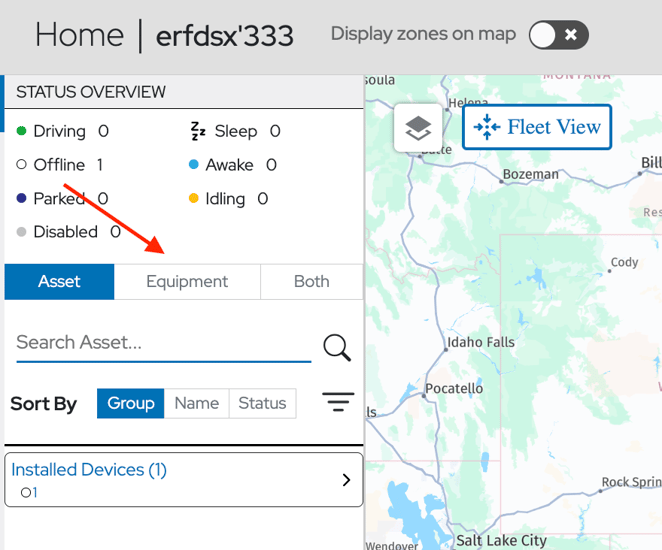
A new Equipment toggle has been added to the asset side panel. When enabled, Asset Trackers PulseSol and PulseCore will be displayed.
Users can:
- Show or hide Asset Trackers
- Search for specific assets
- Sort assets
- Filter assets
- View asset details
- Access route history
The Equipment view supports the same sorting and filtering capabilities available for vehicle assets.
Viewing Asset Information
Selecting an Asset Tracker from the asset list opens the Asset Details panel.
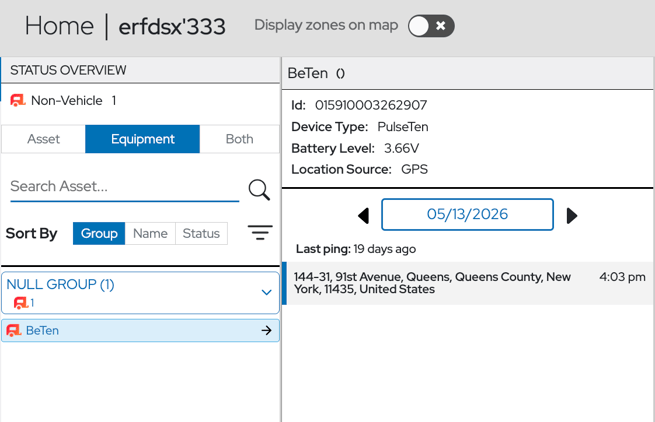
The Asset Details panel displays the following information:
Unique ID
A unique identifier assigned to the Asset Tracker device.
This identifier can be used to distinguish assets and assist with troubleshooting, reporting, and device management.
Device Type
Displays the Asset Tracker model associated with the selected asset.
This helps users identify the hardware type being used to monitor the asset.
Battery Level
Displays the current battery level reported by the Asset Tracker.
Battery status can be used to monitor device health and identify trackers that may require maintenance or battery replacement.
Location Source
Displays the technology used to determine the asset's reported location.
Possible location sources may include:
- GPS/GNSS
- Wi-Fi Positioning
- Cellular Positioning
Location source information can help users understand the accuracy and origin of a reported location.
Route History
Users can view historical asset movement for a selected date.
Route History allows users to:
- Review previous asset locations
- Understand asset movement patterns
If the asset remained at the same location throughout the selected date, RoscoLive will display a single location entry representing that location.
If the asset changed locations during the selected date, RoscoLive will display all reported location events based on the device's reporting schedule and location pings. Each entry represents a recorded location update received from the Asset Tracker.
Map Icon
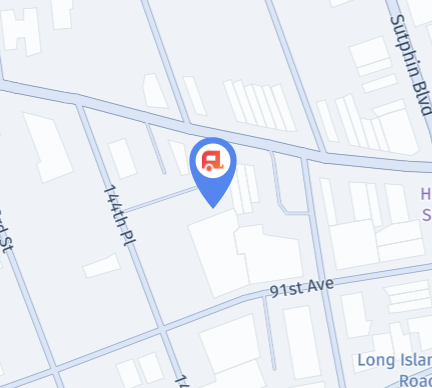
The Asset Tracker icon represents the current location of a tracked asset on the RoscoLive map.
The icon allows users to quickly identify and locate equipment, trailers, containers, and other tracked assets.
Benefits
The Asset Tracker integration enables organizations to:
- View vehicles and equipment from a single platform
- Monitor asset locations in real time
- Access historical asset movement
- Track equipment utilization
- Improve operational visibility
- Reduce asset loss
By purchasing Asset Trackers through RoscoLive, organizations gain a centralized view of both powered and non-powered assets, all within a single platform.