---
title: RoscoLive v2.38.0 Feature Snapshot
description: Here is what we have coming in RoscoLive v2.38.0!
---
[Skip to content](https://support.roscovision.com/knowledge/roscolive-v2.38.0-feature-snapshot#main-content)
English
Show submenu for translations

- [DV6](https://roscolive.com/#dv6)
- [RoscoLive](https://roscolive.com/#rosco-live)
- [Integration Partners](https://roscolive.com/#integration-partners)
- [Why Rosco](https://roscolive.com/#why-rosco)
Open main navigation
Close main navigation
- [DV6](https://roscolive.com/#dv6)
- [RoscoLive](https://roscolive.com/#rosco-live)
- [Integration Partners](https://roscolive.com/#integration-partners)
- [Why Rosco](https://roscolive.com/#why-rosco)
- English
Show submenu for translations
- Contact us
Contact us
How can we help you?
- There are no suggestions because the search field is empty.
1. [Knowledge Base & Support Center](https://support.roscovision.com/knowledge?hsLang=en)
2. [RoscoLive](https://support.roscovision.com/knowledge/roscolive?hsLang=en)
3. [Releases & Announcements](https://support.roscovision.com/knowledge/roscolive?hsLang=en#releases-announcements)
# RoscoLive v2.38.0 Feature Snapshot
## Here is what we have coming in RoscoLive v2.38.0!
### ✨New Features & Enhancements
### Camera Alignment Alerts (CH1 & CH2)
RoscoLive now detects when either the road-facing (CH1) or driver-facing (CH2) camera becomes misaligned and notifies users proactively.
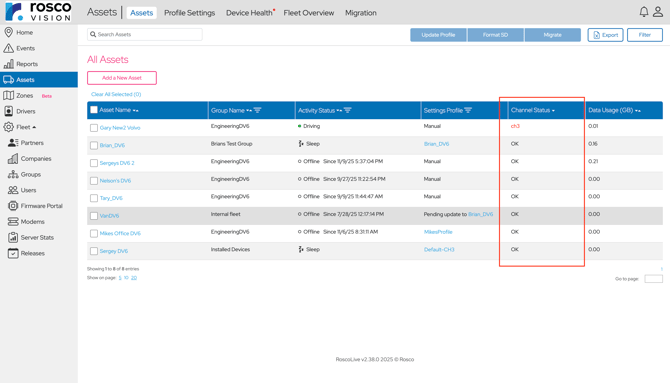
- If the driver-facing camera (CH2) shifts out of alignment and no longer captures the driver correctly, RoscoLive triggers a “**CH2 Misalignment**” alert.
- If the road-facing camera (CH1) is unable to maintain its calibrated view of the road, a “**CH1 Misalignment**” alert is generated.
**What’s new**
- Automatic detection of camera misalignment
- Alerts now appear on the Vehicles page under the Channel Status section.
****
- Optional **Email/SMS notification** when a misalignment occurs

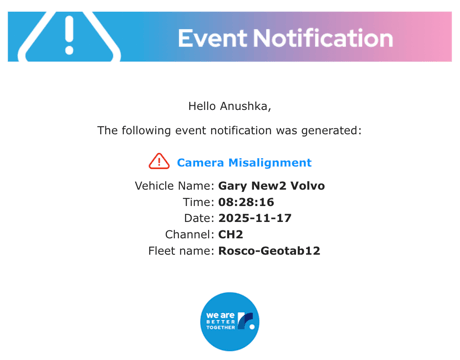
These alerts help users identify when a camera needs adjustment so it can continue capturing accurate video and events without interruption.
### Audio Options for Event Alerts
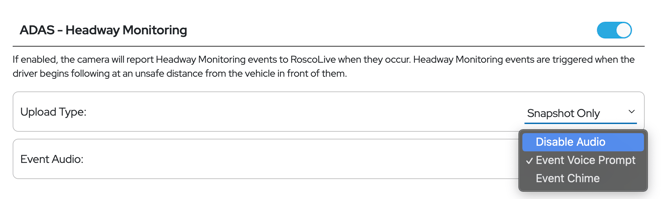
Users now have more control over how in-cab alerts sound. Instead of only using voice prompts or chimes, you can now choose one of three audio options for supported driving events:
- **Voice Prompt** – Plays a verbal alert
- **Chime** – Plays a simple tone instead of a voice message
- **Disable Audio** – No sound; event is logged silently in RoscoLive
This gives more control over alert behavior and helps reduce unnecessary passenger disturbance.
**Applies to:**
Harsh Braking, Harsh Acceleration, Potential CH2 Obstruction, Seatbelt, Distraction, Tailgating, Headway Monitoring, Max Speed.
**Where to configure:**
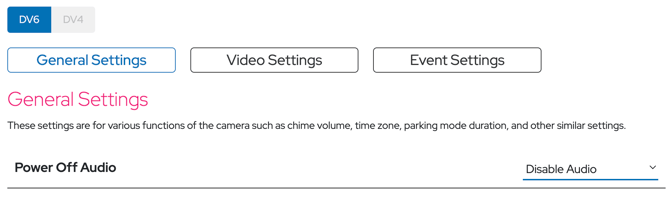
Vehicles -\> Settings Profile -\> Select Profile -\> Edit -\> Event Settings
This change also applies to the **Power Off** event under General Settings.
### Partial Video Upload & Resume
RoscoLive now supports partial video availability. If an event video upload is interrupted, the portion that was successfully uploaded will still be viewable in RoscoLive.
**What’s new**
- If only part of the video uploads, the clip will appear in RoscoLive with a new status: **Partial Video**
- Users can play the uploaded portion in the Event Viewer
- When connection resumes, the device continues uploading from where it left off
- Once complete, the partial video is automatically replaced by the full version
**Why this matters**
Even if connectivity is lost during an event, users still get immediate visibility into critical footage instead of waiting for a full upload or ending up with no video at all.
### Profile Update Progress Tracking
You can now track the status of profile updates pushed to cameras in real time. RoscoLive shows exactly which cameras are pending, receiving, applying, or have completed the update - eliminating guesswork and reducing troubleshooting time.
**What’s new**
- Clear update status for every camera:
- **Pending Update** - Camera is offline; update will send when it comes online
- **Applying Update** - Update is being applied (on ignition or immediately if online)
- **Done** - Update completed successfully
- **Done (with errors)** - Update completed but with device/SD card warnings
- Visual dashboard showing:
- Overall progress (percentage of cameras updated)
- Breakdown of cameras by status
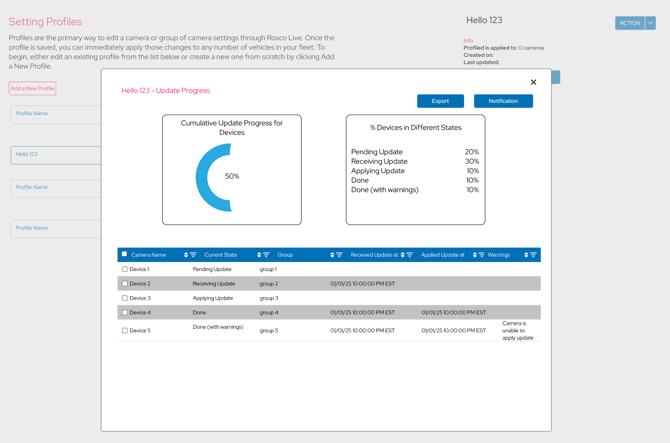
- Data export available for reporting or tracking
**Benefit**
Users get full visibility of update progress across all cameras, making rollout faster and reducing the need to manually verify device updates.
### Asset/Device Restructuring
This is a broader structural change across RoscoLive, and at a high level, what you’ll notice is that we’ve introduced a clear separation between two core concepts in the platform:
- **Assets** - the equipment the customer owns and operates
- **Devices** - the cameras or connected hardware installed on those assets
This shift allows RoscoLive to support non-vehicle assets, multiple device types, and future hardware products under one unified, scalable framework.
As part of this change, RoscoLive will now use the term **Asset** instead of **Vehicle** across several UI pages, reflecting support for additional asset and device types.
**What’s new**
- All references to ‘Vehicle’ in the UI have been updated to reflect that it is now a subset of "Asset."
- DV6/DV7 (camera devices) are treated as the primary device associated with an asset
**Updates across RoscoLive**
- **Home Page:**
- “Status” under Sort By → **Device Status**
- **Events Page:**
- “Vehicle” column → **Asset**
- New Filter dropdown replaces the Columns dropdown
- Events dropdown merged into All Filters
- **Reports Page:**
- Vehicle Activity → **Asset Activity**
- Vehicle Event Breakdown → **Asset Event Breakdown**
- “Vehicle Name” column → **Asset**
- **Assets Page (formerly Vehicles Page):**
- Page renamed to **Assets**
- “At a Glance” tab → **Assets**
- “Settings” tab → **Profile Settings**
- “Camera Health” tab → **Device Health**
- New **Fleet Overview** tab added (Fleet Activity Status, Fleet Data Usage and Device Health)
**Benefit**
This implementation provides a more accurate and scalable structure as RoscoLive expands beyond vehicles to support additional asset types and devices.
- [RoscoLive](https://support.roscovision.com/knowledge/roscolive?hsLang=en#main-content)
- [Developer Resources](https://support.roscovision.com/knowledge/roscolive?hsLang=en#developer-resources)
- [Guides](https://support.roscovision.com/knowledge/roscolive?hsLang=en#guides)
- [Releases & Announcements](https://support.roscovision.com/knowledge/roscolive?hsLang=en#releases-announcements)
- [RoscoLive-Geotab](https://support.roscovision.com/knowledge/roscolive-geotab?hsLang=en#main-content)
- [Release Notes](https://support.roscovision.com/knowledge/roscolive-geotab?hsLang=en#release-notes)
- [User Guides](https://support.roscovision.com/knowledge/roscolive-geotab?hsLang=en#user-guides)
- [360AHD](https://support.roscovision.com/knowledge/360ahd?hsLang=en#main-content)
- [Quick Start Guide](https://support.roscovision.com/knowledge/360ahd?hsLang=en#quick-start-guide)
- [User Manual](https://support.roscovision.com/knowledge/360ahd?hsLang=en#user-manual)
- [RoscoLive Installer App](https://support.roscovision.com/knowledge/roscolive-installer-app?hsLang=en#main-content)
- [Release Notes](https://support.roscovision.com/knowledge/roscolive-installer-app?hsLang=en#release-notes)
- [User Guide](https://support.roscovision.com/knowledge/roscolive-installer-app?hsLang=en#user-guide)
- [Installer Certification Knowledge Base](https://support.roscovision.com/knowledge/roscolive-installer-app?hsLang=en#installer-certification-knowledge-base)
- [DV6 Dash Cam](https://support.roscovision.com/knowledge/dv6-dash-cam?hsLang=en#main-content)
- [User Manual](https://support.roscovision.com/knowledge/dv6-dash-cam?hsLang=en#user-manual)
- [Specifications](https://support.roscovision.com/knowledge/dv6-dash-cam?hsLang=en#specifications)
- [Brochure](https://support.roscovision.com/knowledge/dv6-dash-cam?hsLang=en#brochure)
- [Install Guide](https://support.roscovision.com/knowledge/dv6-dash-cam?hsLang=en#install-guide)
- [Quick Start Guides](https://support.roscovision.com/knowledge/dv6-dash-cam?hsLang=en#quick-start-guides)
- [DV7 Dash Cam](https://support.roscovision.com/knowledge/dv7-dash-cam?hsLang=en#main-content)
- [Quick Start Guides](https://support.roscovision.com/knowledge/dv7-dash-cam?hsLang=en#quick-start-guides)
- [Driver ID](https://support.roscovision.com/knowledge/driver-id?hsLang=en)
- [Asset Tracker](https://support.roscovision.com/knowledge/asset-tracker?hsLang=en)
- [DV-Pro5 Player](https://support.roscovision.com/knowledge/dv-pro5-player?hsLang=en)
- [DVXC4 Dash Cam](https://support.roscovision.com/knowledge/dvxc4-dash-cam?hsLang=en#main-content)
- [Brochure](https://support.roscovision.com/knowledge/dvxc4-dash-cam?hsLang=en#brochure)
- [Quick Start Guide](https://support.roscovision.com/knowledge/dvxc4-dash-cam?hsLang=en#quick-start-guide)
- [Specifications](https://support.roscovision.com/knowledge/dvxc4-dash-cam?hsLang=en#specifications)
- [Installation](https://support.roscovision.com/knowledge/dvxc4-dash-cam?hsLang=en#installation)
- [Firmware Upgrade](https://support.roscovision.com/knowledge/dvxc4-dash-cam?hsLang=en#firmware-upgrade)
- [Troubleshooting](https://support.roscovision.com/knowledge/dvxc4-dash-cam?hsLang=en#troubleshooting)
- [User Manuals](https://support.roscovision.com/knowledge/dvxc4-dash-cam?hsLang=en#user-manuals)
- [Contact Us](https://support.roscovision.com/knowledge/contact-us?hsLang=en)
- [Troubleshooting Guides](https://support.roscovision.com/knowledge/troubleshooting-guides?hsLang=en)
- [DV6](https://roscolive.com/#dv6)
- [RoscoLive](https://roscolive.com/#rosco-live)
- [Integration Partners](https://roscolive.com/#integration-partners)
- [Why Rosco](https://roscolive.com/#why-rosco)
[](https://www.roscovision.com)
[mailto:email@email.com](mailto:email@email.com)
Copyright © 2025, Rosco Vision