---
title: RoscoLive v2.41.0 Feature Snapshot
description: Here is what we have coming in RoscoLive v2.41.0!
---
[Skip to content](https://support.roscovision.com/knowledge/roscolive-v2.41.0-feature-snapshot#main-content)
English
Show submenu for translations

- [DV6](https://roscolive.com/#dv6)
- [RoscoLive](https://roscolive.com/#rosco-live)
- [Integration Partners](https://roscolive.com/#integration-partners)
- [Why Rosco](https://roscolive.com/#why-rosco)
Open main navigation
Close main navigation
- [DV6](https://roscolive.com/#dv6)
- [RoscoLive](https://roscolive.com/#rosco-live)
- [Integration Partners](https://roscolive.com/#integration-partners)
- [Why Rosco](https://roscolive.com/#why-rosco)
- English
Show submenu for translations
- Contact us
Contact us
How can we help you?
- There are no suggestions because the search field is empty.
1. [Knowledge Base & Support Center](https://support.roscovision.com/knowledge?hsLang=en)
2. [RoscoLive](https://support.roscovision.com/knowledge/roscolive?hsLang=en)
3. [Releases & Announcements](https://support.roscovision.com/knowledge/roscolive?hsLang=en#releases-announcements)
# RoscoLive v2.41.0 Feature Snapshot
## Here is what we have coming in RoscoLive v2.41.0!
### ✨New Features
###### **PulseCore and PulseSol**
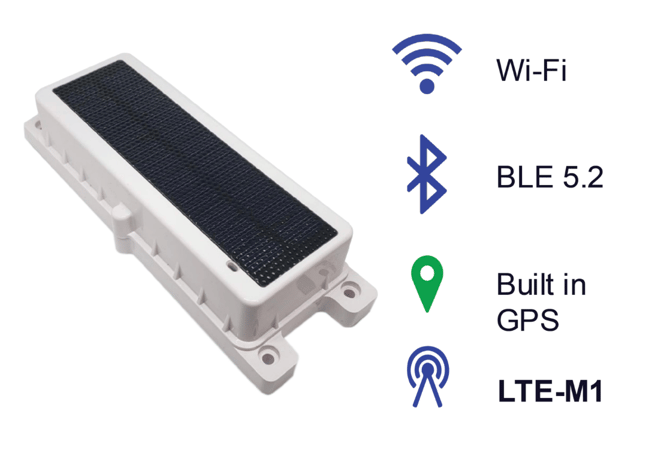
PulseCore and PulseSol Asset Tracker Integration introduces non-vehicle asset visibility within RoscoLive, allowing customers to view location history for trailers, containers, generators, and other equipment directly on the map alongside vehicle fleets. Phase 1 focuses on surfacing location pings from PulseCore and PulseSol asset trackers, displaying lightweight trail history based on device reporting frequency, and enabling users to track recent movement and last known location through the existing RoscoLive map.
PulseCore and PulseSol asset tracking devices must be purchased separately. For more information, please contact our Sales team at [videomatics@roscovision.com](mailto:videomatics@roscovision.com).
###### **CH1 Calibration box**
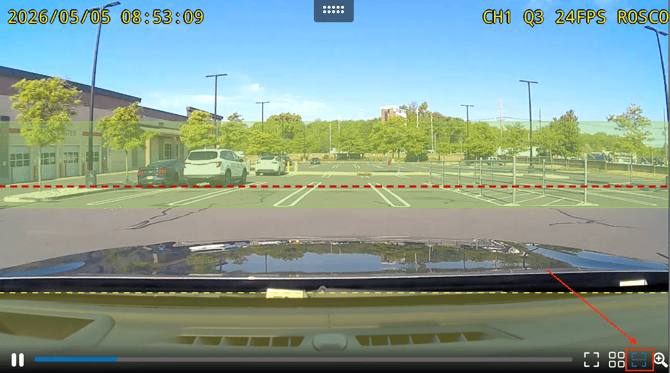
ADAS calibration overlay support is now available for CH1 across Live Stream, Event Video Playback, and Event Snapshots. Users can press the calibration button to display a horizontal alignment line and visual calibration markers on the road-facing camera to assist with camera positioning and calibration verification.
###### **Speed Sensitivity Slider**
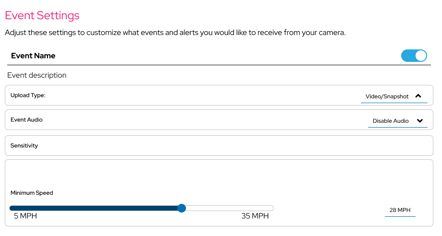
We’re introducing configurable speed sensitivity thresholds for DMS events, allowing fleets to better control when driver monitoring events trigger based on vehicle speed.
**Events Updated**
• DMS – Yawning (5–35 MPH)
• DMS – Dozing (5–35 MPH)
• DMS – Distraction (5–35 MPH)
• DMS – Seatbelt (5–35 MPH)
• DMS – Camera Blocked/Misaligned (5–35 MPH)
• DMS – Phone Use (0–35 MPH)
• DMS – Smoking (0–35 MPH)
****
###### **Data Max Overage Enhancements**
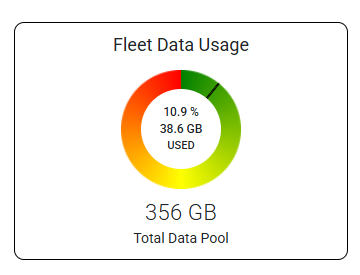
Updated the company data pool allocation logic to automatically provision additional data capacity when new vehicles are added after the start of the monthly billing cycle. Improvements were also made to the handling of mid-month vehicle additions for Data Max overage calculations to ensure more accurate usage tracking and billing behavior.
###### **Shareable Event Video Links**
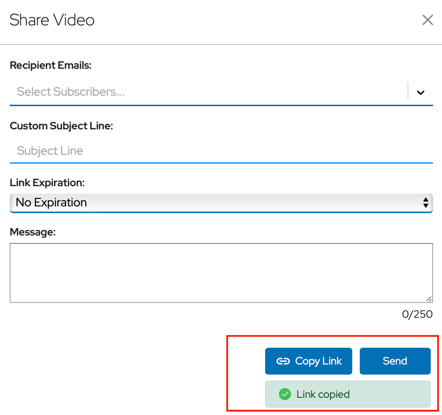
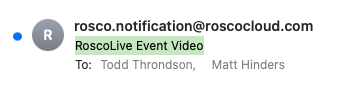
Secure, shareable direct links for event video clips are now available within the RoscoLive Events experience. Users can quickly copy and share video links without downloading large video files, with support for customizable subject lines when sharing videos. Shared links can be pasted into a browser to directly access and play the video.
###### **Config Audit Log Enhancement**
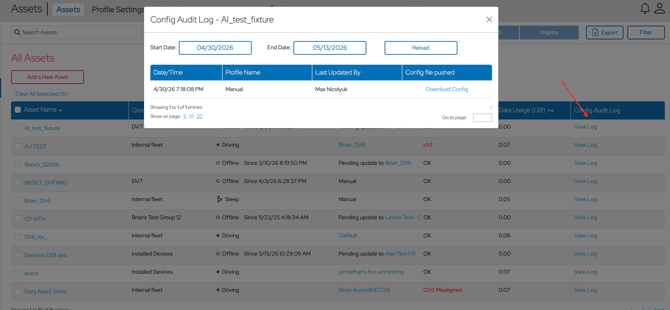
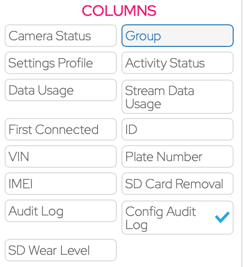
The new Config Audit Log provides improved visibility into profile and configuration pushes to devices. Users can now review configuration push history, including Date/Time, Last Updated By, Profile Name, and Config File Pushed. Configurations pushed manually outside of profile assignments are identified with “Manual” under the Profile Name column. The Config Audit Log is also available as a column filter option for easier table customization and visibility.
###### 
###### 
###### **Device Time & Camera Status Improvements**
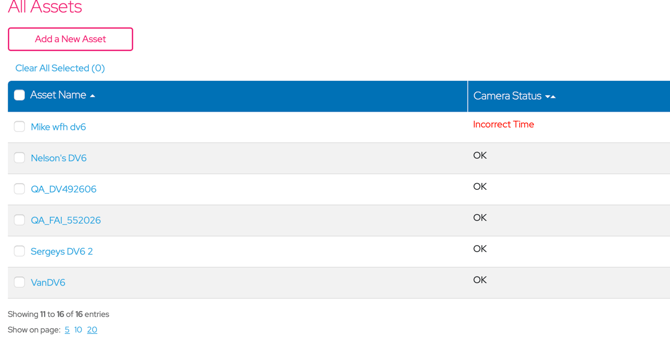
Device time monitoring is now available to help identify cameras with incorrect time settings. Devices with persistent time synchronization issues will display a new “Incorrect Device Time” camera status and generate notifications for improved visibility and troubleshooting. The “Channel Status” column on the Vehicles page has also been renamed to “Camera Status” for better clarity. Time-related warnings automatically clear once the device time is corrected.
###### 
###### **Paired GO Device Report**
The new “Paired GO Device Report” is now available under Standard Reports and includes paired device details such as Camera Name, GO Device Group, and IMEI/SN information. This report provides improved visibility into camera-to-GO device associations and paired device inventory.
###### **Idling status**
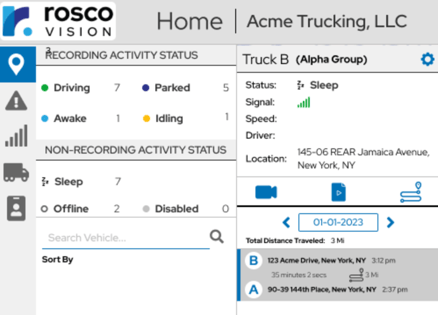
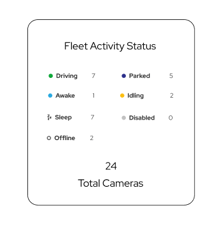
A new “Idling” vehicle status is now available to provide better visibility into vehicles that are powered on but not actively driving. This helps fleets more easily distinguish between active driving, parked, and idle operational states while maintaining continuous recording behavior during idle periods.
The “Idling” status is now visible on the Home Page, Vehicles Page and within Geotab Camera Admin and Live Video tabs. Devices continue recording normally while in Idling mode.
###### **Events Settings Navigation Improvements**
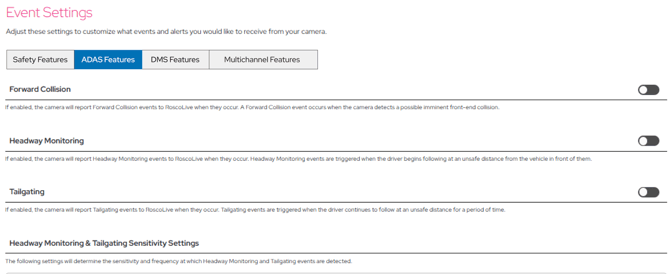
The Events Settings page has been reorganized to improve usability as additional DV7 AI events continue to expand. Event settings are now grouped into dedicated categories — ADAS Features, DMS Features, Safety Features, and Multichannel Features — with a new navigation bar that allows users to switch more easily between event types without excessive scrolling.
###### **Improved Address Detail Accuracy**
Improved reverse geocoding results to return more detailed and accurate address information across the platform. Addresses will now include richer location details such as street number, street name, city, state, neighborhood, and country where available, instead of only a formatted address.
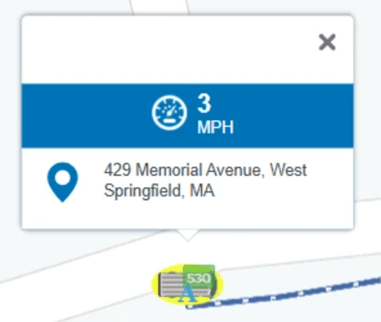
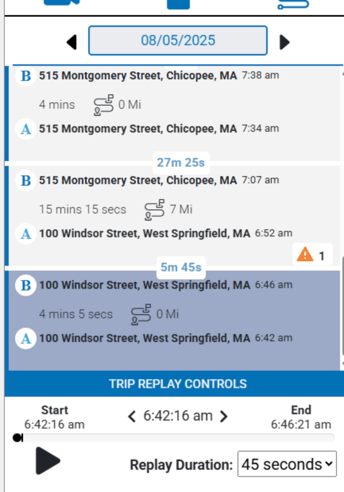
###### **Continuous Trip Replay Playback**
Enhanced the Trip Replay experience to automatically play consecutive trips in sequence without requiring manual trip selection. Users can now seamlessly replay all remaining trips for the day starting from any selected trip.
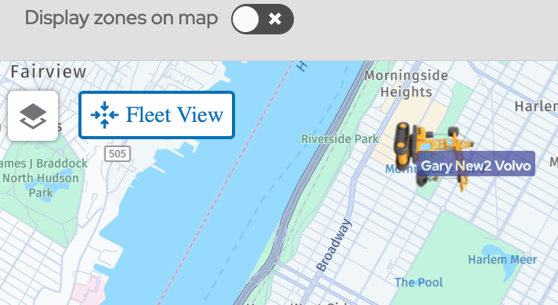
###### **Enhanced Fleet Map Navigation & Re-Centering**
Improved the fleet map experience with faster and smoother navigation controls. Selecting an asset now automatically zooms into the vehicle for quicker access, while a new fleet view option allows users to instantly return to the full fleet map view from any zoom level or vehicle-focused view.
- [RoscoLive](https://support.roscovision.com/knowledge/roscolive?hsLang=en#main-content)
- [Developer Resources](https://support.roscovision.com/knowledge/roscolive?hsLang=en#developer-resources)
- [Guides](https://support.roscovision.com/knowledge/roscolive?hsLang=en#guides)
- [Releases & Announcements](https://support.roscovision.com/knowledge/roscolive?hsLang=en#releases-announcements)
- [RoscoLive-Geotab](https://support.roscovision.com/knowledge/roscolive-geotab?hsLang=en#main-content)
- [Release Notes](https://support.roscovision.com/knowledge/roscolive-geotab?hsLang=en#release-notes)
- [User Guides](https://support.roscovision.com/knowledge/roscolive-geotab?hsLang=en#user-guides)
- [360AHD](https://support.roscovision.com/knowledge/360ahd?hsLang=en#main-content)
- [Quick Start Guide](https://support.roscovision.com/knowledge/360ahd?hsLang=en#quick-start-guide)
- [User Manual](https://support.roscovision.com/knowledge/360ahd?hsLang=en#user-manual)
- [RoscoLive Installer App](https://support.roscovision.com/knowledge/roscolive-installer-app?hsLang=en#main-content)
- [Release Notes](https://support.roscovision.com/knowledge/roscolive-installer-app?hsLang=en#release-notes)
- [User Guide](https://support.roscovision.com/knowledge/roscolive-installer-app?hsLang=en#user-guide)
- [Installer Certification Knowledge Base](https://support.roscovision.com/knowledge/roscolive-installer-app?hsLang=en#installer-certification-knowledge-base)
- [DV6 Dash Cam](https://support.roscovision.com/knowledge/dv6-dash-cam?hsLang=en#main-content)
- [User Manual](https://support.roscovision.com/knowledge/dv6-dash-cam?hsLang=en#user-manual)
- [Specifications](https://support.roscovision.com/knowledge/dv6-dash-cam?hsLang=en#specifications)
- [Brochure](https://support.roscovision.com/knowledge/dv6-dash-cam?hsLang=en#brochure)
- [Install Guide](https://support.roscovision.com/knowledge/dv6-dash-cam?hsLang=en#install-guide)
- [Quick Start Guides](https://support.roscovision.com/knowledge/dv6-dash-cam?hsLang=en#quick-start-guides)
- [DV7 Dash Cam](https://support.roscovision.com/knowledge/dv7-dash-cam?hsLang=en#main-content)
- [Quick Start Guides](https://support.roscovision.com/knowledge/dv7-dash-cam?hsLang=en#quick-start-guides)
- [Driver ID](https://support.roscovision.com/knowledge/driver-id?hsLang=en)
- [Asset Tracker](https://support.roscovision.com/knowledge/asset-tracker?hsLang=en)
- [DV-Pro5 Player](https://support.roscovision.com/knowledge/dv-pro5-player?hsLang=en)
- [DVXC4 Dash Cam](https://support.roscovision.com/knowledge/dvxc4-dash-cam?hsLang=en#main-content)
- [Brochure](https://support.roscovision.com/knowledge/dvxc4-dash-cam?hsLang=en#brochure)
- [Quick Start Guide](https://support.roscovision.com/knowledge/dvxc4-dash-cam?hsLang=en#quick-start-guide)
- [Specifications](https://support.roscovision.com/knowledge/dvxc4-dash-cam?hsLang=en#specifications)
- [Installation](https://support.roscovision.com/knowledge/dvxc4-dash-cam?hsLang=en#installation)
- [Firmware Upgrade](https://support.roscovision.com/knowledge/dvxc4-dash-cam?hsLang=en#firmware-upgrade)
- [Troubleshooting](https://support.roscovision.com/knowledge/dvxc4-dash-cam?hsLang=en#troubleshooting)
- [User Manuals](https://support.roscovision.com/knowledge/dvxc4-dash-cam?hsLang=en#user-manuals)
- [Contact Us](https://support.roscovision.com/knowledge/contact-us?hsLang=en)
- [Troubleshooting Guides](https://support.roscovision.com/knowledge/troubleshooting-guides?hsLang=en)
- [DV6](https://roscolive.com/#dv6)
- [RoscoLive](https://roscolive.com/#rosco-live)
- [Integration Partners](https://roscolive.com/#integration-partners)
- [Why Rosco](https://roscolive.com/#why-rosco)
[](https://www.roscovision.com)
[mailto:email@email.com](mailto:email@email.com)
Copyright © 2025, Rosco Vision