---
title: RoscoLive v2.41.0 Geotab Add-In Feature Snapshot
description: Here is what we have coming in the RoscoLive Geotab Add-In v2.41.0!
---
[Skip to content](https://support.roscovision.com/knowledge/roscolive-v2.41.0-geotab-add-in-feature-snapshot#main-content)
English
Show submenu for translations

- [DV6](https://roscolive.com/#dv6)
- [RoscoLive](https://roscolive.com/#rosco-live)
- [Integration Partners](https://roscolive.com/#integration-partners)
- [Why Rosco](https://roscolive.com/#why-rosco)
Open main navigation
Close main navigation
- [DV6](https://roscolive.com/#dv6)
- [RoscoLive](https://roscolive.com/#rosco-live)
- [Integration Partners](https://roscolive.com/#integration-partners)
- [Why Rosco](https://roscolive.com/#why-rosco)
- English
Show submenu for translations
- Contact us
Contact us
How can we help you?
- There are no suggestions because the search field is empty.
1. [Knowledge Base & Support Center](https://support.roscovision.com/knowledge?hsLang=en)
2. [RoscoLive-Geotab](https://support.roscovision.com/knowledge/roscolive-geotab?hsLang=en)
3. [Release Notes](https://support.roscovision.com/knowledge/roscolive-geotab?hsLang=en#release-notes)
# RoscoLive v2.41.0 Geotab Add-In Feature Snapshot
## Here is what we have coming in the RoscoLive Geotab Add-In for v2.41.0!
### 🛠️ Improvements
###### **CH1 Calibration box**
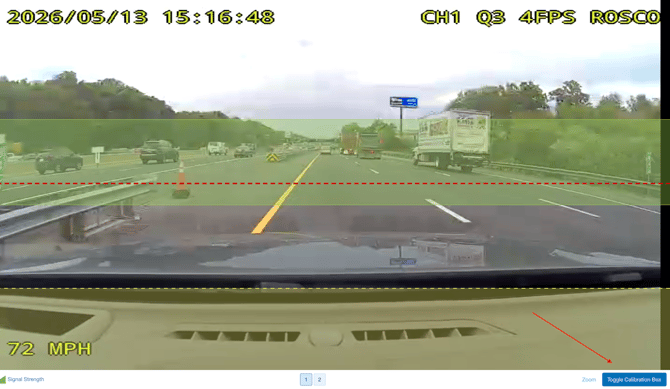
ADAS calibration overlay support is now available for CH1 across Live Stream, Event Video Playback, and Event Snapshots. Users can press the calibration button to display a horizontal alignment line and visual calibration markers on the road-facing camera to assist with camera positioning and calibration verification.
###### **Shareable Event Video Links**
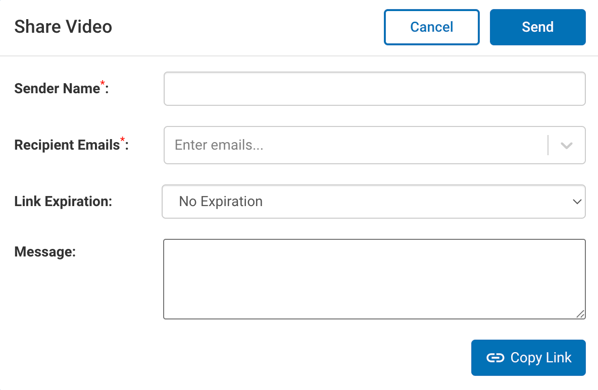
Secure, shareable direct links for event video clips are now available within the RoscoLive Events experience. Users can quickly copy and share video links without downloading large video files. Shared links can be pasted into a browser to directly access and play the video.
###### **Config Audit Log Enhancement**
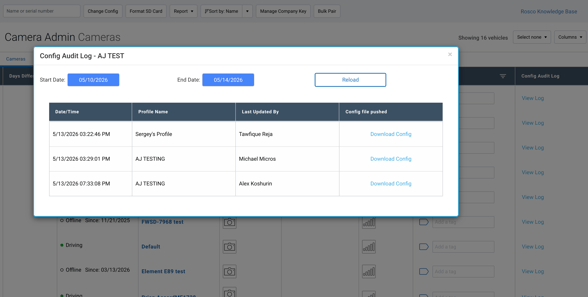
The new Config Audit Log provides improved visibility into profile and configuration pushes to devices. Users can now review configuration push history, including Date/Time, Last Updated By, Profile Name, and Config File pushed. The Config Audit Log is also available as a column filter option for easier table customization and visibility.
###### **Idling status**
A new “Idling” vehicle status is now available to provide better visibility into vehicles that are powered on but not actively driving. This helps fleets more easily distinguish between active driving, parked, and idle operational states while maintaining continuous recording behavior during idle periods.
The “Idling” status is visible on Geotab Camera Admin and Live Video tabs. Devices continue recording normally while in Idling mode.
###### **Event Audio Playback**
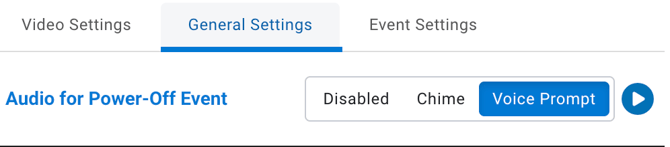
Users can now preview Voice Prompt and Chime audio directly within Fleet Profile settings before applying configurations. This enhancement reduces setup friction by eliminating guesswork and minimizing the need for repeated in-vehicle testing to verify driver-facing audio behavior.
###### **Event Settings Navigation Improvements for Geotab**
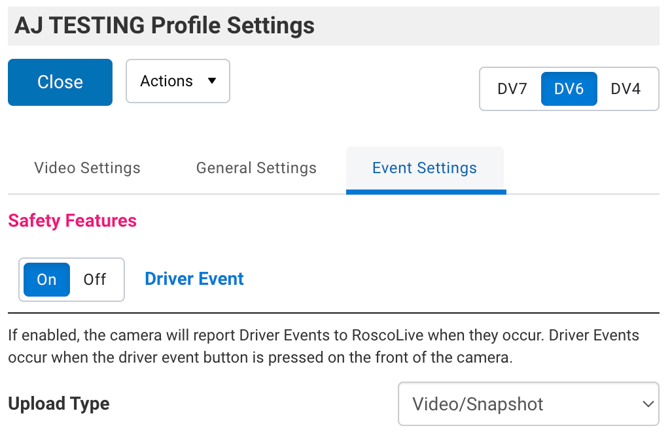
The Event Settings page within Geotab Camera Admin has been reorganized to improve navigation and usability as it continues to expand. Event settings are now grouped into dedicated categories — ADAS Features, DMS Features, and Safety Features, allowing users to navigate between event types more easily while keeping all existing settings, functionality, and configurations unchanged.
- [RoscoLive](https://support.roscovision.com/knowledge/roscolive?hsLang=en#main-content)
- [Developer Resources](https://support.roscovision.com/knowledge/roscolive?hsLang=en#developer-resources)
- [Guides](https://support.roscovision.com/knowledge/roscolive?hsLang=en#guides)
- [Releases & Announcements](https://support.roscovision.com/knowledge/roscolive?hsLang=en#releases-announcements)
- [RoscoLive-Geotab](https://support.roscovision.com/knowledge/roscolive-geotab?hsLang=en#main-content)
- [Release Notes](https://support.roscovision.com/knowledge/roscolive-geotab?hsLang=en#release-notes)
- [User Guides](https://support.roscovision.com/knowledge/roscolive-geotab?hsLang=en#user-guides)
- [360AHD](https://support.roscovision.com/knowledge/360ahd?hsLang=en#main-content)
- [Quick Start Guide](https://support.roscovision.com/knowledge/360ahd?hsLang=en#quick-start-guide)
- [User Manual](https://support.roscovision.com/knowledge/360ahd?hsLang=en#user-manual)
- [RoscoLive Installer App](https://support.roscovision.com/knowledge/roscolive-installer-app?hsLang=en#main-content)
- [Release Notes](https://support.roscovision.com/knowledge/roscolive-installer-app?hsLang=en#release-notes)
- [User Guide](https://support.roscovision.com/knowledge/roscolive-installer-app?hsLang=en#user-guide)
- [Installer Certification Knowledge Base](https://support.roscovision.com/knowledge/roscolive-installer-app?hsLang=en#installer-certification-knowledge-base)
- [DV6 Dash Cam](https://support.roscovision.com/knowledge/dv6-dash-cam?hsLang=en#main-content)
- [User Manual](https://support.roscovision.com/knowledge/dv6-dash-cam?hsLang=en#user-manual)
- [Specifications](https://support.roscovision.com/knowledge/dv6-dash-cam?hsLang=en#specifications)
- [Brochure](https://support.roscovision.com/knowledge/dv6-dash-cam?hsLang=en#brochure)
- [Install Guide](https://support.roscovision.com/knowledge/dv6-dash-cam?hsLang=en#install-guide)
- [Quick Start Guides](https://support.roscovision.com/knowledge/dv6-dash-cam?hsLang=en#quick-start-guides)
- [DV7 Dash Cam](https://support.roscovision.com/knowledge/dv7-dash-cam?hsLang=en#main-content)
- [Quick Start Guides](https://support.roscovision.com/knowledge/dv7-dash-cam?hsLang=en#quick-start-guides)
- [Driver ID](https://support.roscovision.com/knowledge/driver-id?hsLang=en)
- [Asset Tracker](https://support.roscovision.com/knowledge/asset-tracker?hsLang=en)
- [DV-Pro5 Player](https://support.roscovision.com/knowledge/dv-pro5-player?hsLang=en)
- [DVXC4 Dash Cam](https://support.roscovision.com/knowledge/dvxc4-dash-cam?hsLang=en#main-content)
- [Brochure](https://support.roscovision.com/knowledge/dvxc4-dash-cam?hsLang=en#brochure)
- [Quick Start Guide](https://support.roscovision.com/knowledge/dvxc4-dash-cam?hsLang=en#quick-start-guide)
- [Specifications](https://support.roscovision.com/knowledge/dvxc4-dash-cam?hsLang=en#specifications)
- [Installation](https://support.roscovision.com/knowledge/dvxc4-dash-cam?hsLang=en#installation)
- [Firmware Upgrade](https://support.roscovision.com/knowledge/dvxc4-dash-cam?hsLang=en#firmware-upgrade)
- [Troubleshooting](https://support.roscovision.com/knowledge/dvxc4-dash-cam?hsLang=en#troubleshooting)
- [User Manuals](https://support.roscovision.com/knowledge/dvxc4-dash-cam?hsLang=en#user-manuals)
- [Contact Us](https://support.roscovision.com/knowledge/contact-us?hsLang=en)
- [Troubleshooting Guides](https://support.roscovision.com/knowledge/troubleshooting-guides?hsLang=en)
- [DV6](https://roscolive.com/#dv6)
- [RoscoLive](https://roscolive.com/#rosco-live)
- [Integration Partners](https://roscolive.com/#integration-partners)
- [Why Rosco](https://roscolive.com/#why-rosco)
[](https://www.roscovision.com)
[mailto:email@email.com](mailto:email@email.com)
Copyright © 2025, Rosco Vision