
✨ New Features
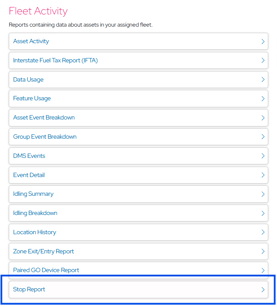
Stop Report
A new table-based report under Fleet Activity that provides comprehensive visibility into vehicle stop activity. Each stop is categorized as either an Idle Stop (engine running, vehicle stationary) or a True Stop (engine off), with duration, location, and long-stop exception indicators.
What's New
- Collapsed fleet summary view showing total stops per vehicle
- Expandable per-stop detail view with stop type, duration, start/end time, and location
- CSV export for compliance and payroll workflows
- Long-stop exception flagging for regulatory reporting
Why It Matters
Fleet managers can now identify excessive idle time, verify driver rest compliance, and reconcile stop activity against schedules all from a single report without needing to cross-reference trips or GPS history manually.
IFTA Report - Asset View & Fleet View
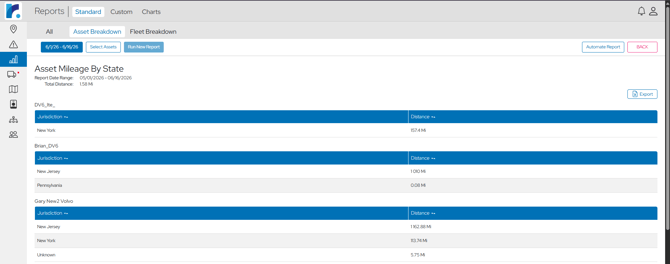
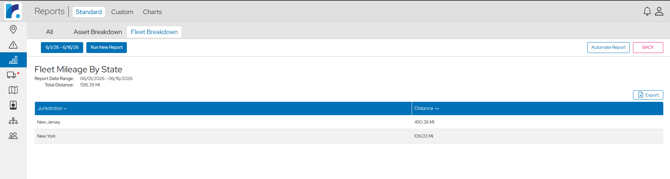
The existing IFTA (International Fuel Tax Agreement) Report has been expanded with two new tabs alongside the original view, giving fleet managers more granular and aggregated perspectives on cross-state mileage.
What's New
- Asset Breakdown by State: Per-state distance broken down by individual vehicle/asset
- Fleet Breakdown by State: Total fleet distance aggregated by state across all vehicles
- Both new views support the existing Automate Report (scheduled email delivery) and Export (CSV download) features
- Seamless tab switching between All, Asset Breakdown, Fleet Breakdown
Why It Matters
IFTA quarterly filing requires accurate state-by-state mileage data. Previously, managers had to manually calculate per-asset or fleet-wide totals. These new views eliminate that manual work, reduce filing errors, and save hours of preparation each quarter.
SD Card Remaining Life
SD card health monitoring is now visible to all external users, with proactive notifications when cards are nearing end of life.
What's New
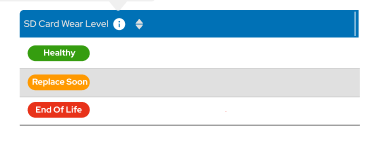
- Color-coded health badges on the Assets page: Healthy (green), Replace Soon (orange), End of Life (red)
- New SD Card Health notification setting under Notification Preferences
- Automated email and/or SMS alerts when wear level drops below 10% or reaches 0%
Why It Matters
Proactive alerts give fleet managers time to schedule replacements before data loss occurs, protecting both drivers and the business.

.png?width=670&height=329&name=image%20(4).png)
Reusable Custom User Settings
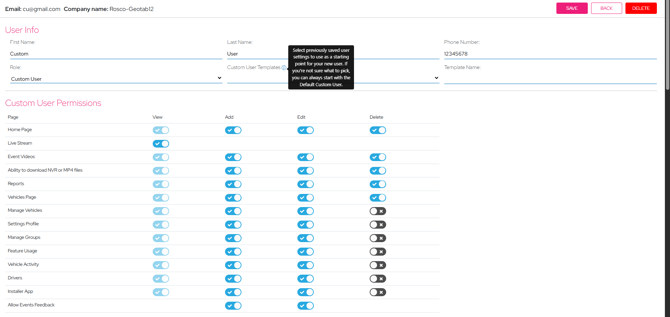
Fleet managers can now save custom user permission as reusable templates, streamlining the process of onboarding new users with consistent access levels.
What's New
- Save a Custom User's permission configuration as a named template
- When creating a new user, select from a dropdown of previously saved profiles
- All toggles, permissions, and preferences are auto-populated from the selected template
- Templates can be updated or deleted as organizational needs change
Why It Matters
Companies with multiple user roles (dispatchers, safety managers, regional admins) previously had to manually configure dozens of toggles for each new user, a tedious and error-prone process. Templates ensure consistency across users in the same role and reduce onboarding time from minutes to seconds.
Parking Mode for High G-Sensor Alerts
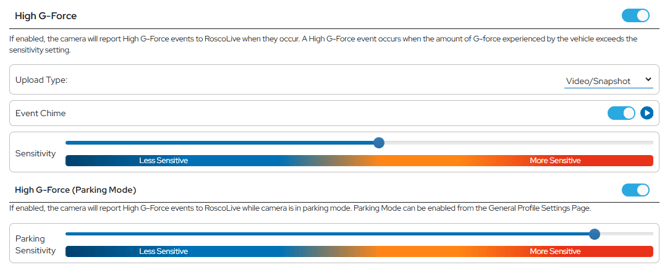
A new configuration option that allows DV6 users to enable impact detection while vehicles are parked and fine-tune the sensitivity threshold to match their environment.
What's New
- New toggle to enable/disable parking-mode High G-Force detection
- Adjustable sensitivity slider (Low → High) to control the G-force threshold that triggers an event
- Settings configurable per profile, allowing different sensitivity levels for different fleet segments
Why It Matters
Parked vehicles are vulnerable to hit-and-run incidents, vandalism, and environmental damage. This feature captures critical video evidence of parking lot impacts while giving fleet managers control over sensitivity to avoid false alerts from minor vibrations or nearby traffic.
Smaller Vehicle Icons
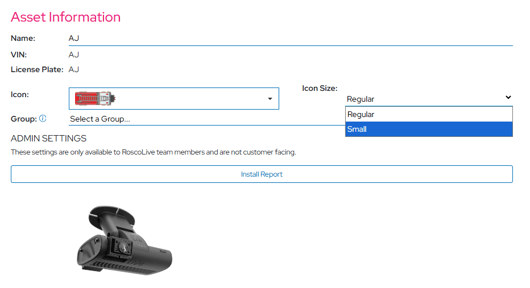
A new display option that lets users reduce the size of vehicle icons on the map, addressing feedback from dense fleets where overlapping icons made it difficult to distinguish individual vehicles.
What's New
- New Icon Size dropdown in device display settings with two options: Regular and Small
- Small icons reduce visual clutter while maintaining all interactive functionality (click, hover, tooltip)
- Setting is saved per user and persists across sessions
Why It Matters
Fleets with hundreds of vehicles concentrated in urban areas or depot locations experienced significant icon overlap, making the map unusable for identifying specific vehicles. Smaller icons restore map readability without sacrificing any functionality.
Escalated Alerts for Drowsiness/Head Down Events
An intelligent escalation system that reduces alert fatigue by only notifying fleet managers when clustered drowsiness or head-down risk is detected, rather than on every individual event.
What's New
- Escalation logic triggers when 2 events occur within 5 minutes or 3 events within 30 minutes
- Only escalated clusters generate fleet manager notifications isolated single events are recorded but do not trigger alerts
Why It Matters
Individual drowsiness or head-down events can be momentary and benign, but clusters indicate a driver in genuine danger. This feature ensures fleet managers are alerted when it truly matters — when a driver is showing sustained signs of fatigue while eliminating the noise of one-off detections that previously led to alert fatigue and ignored notifications.
Event Feedback for Fleet Managers
The thumbs-down feedback feature on event videos and snapshots previously limited to internal and admin users is now available to Fleet Manager roles.
What's New
- Fleet Managers can now flag false-positive events using the thumbs-down button on any event video or snapshot
- Feedback is submitted directly to the AI analysis pipeline for model improvement
- Available on both the Events Page detail view and the Home Page event cards
Why It Matters
Fleet managers are the closest to real-world driving conditions and are best positioned to identify when an AI-detected event is a false positive. Their feedback directly improves detection accuracy over time, leading to fewer false alerts and more trustworthy safety scoring for the entire platform.
✨Improvements
Camera Block vs Camera Misalignment Separation
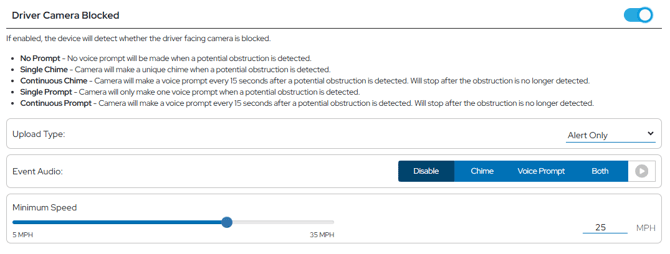
Camera Block and Camera Misalignment are now treated as distinct event types with clearer labeling and improved AI classification.
What's New
- Renamed to "Driver Camera Blocked" and "Camera Misaligned" for clarity
- AI-based reclassification reduces false positives by distinguishing between intentional obstruction and physical misalignment
- Each event type can be independently configured in profiles and notifications
Why It Matters
These two conditions have very different operational implications — a blocked camera may indicate tampering, while misalignment is typically a maintenance issue. Separating them allows fleet managers to prioritize and respond appropriately to each.

Snapshot Clips UI Redesign
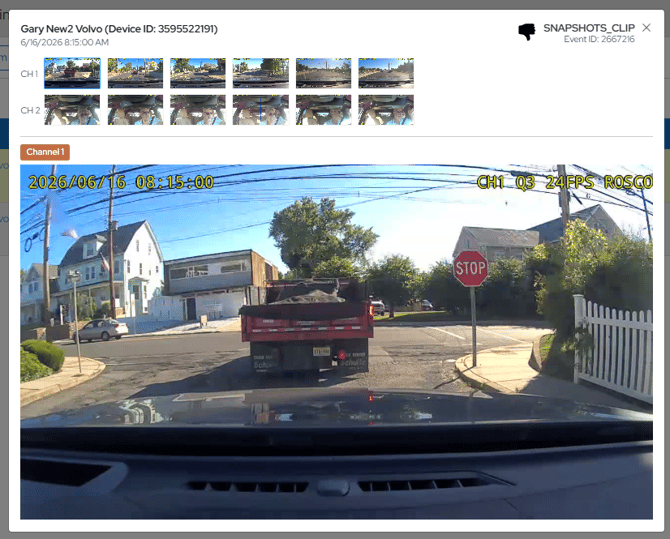
The snapshot viewing experience has been streamlined by replacing the channel-selection modal with an inline multi-channel layout.
What's New
- All available camera channels are displayed simultaneously in a grid view
- No more clicking through a modal to switch between channels
- Faster cross-channel comparison for incident review
Why It Matters
When reviewing a snapshot event, managers often need to see multiple camera angles quickly. The previous modal-based workflow added unnecessary clicks and slowed down the review process. The inline view enables instant side-by-side comparison.
"Both" Audio Option for In-Cab Alerts
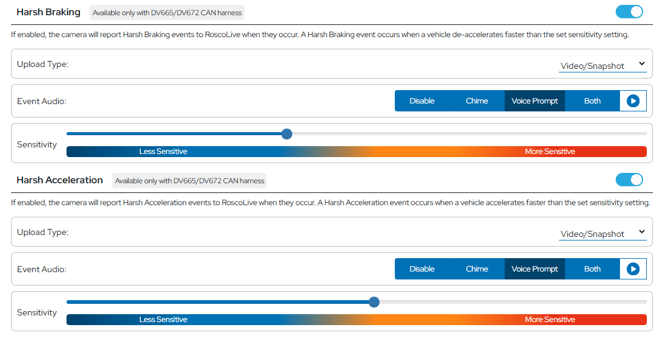
Events that support both chime and voice alerts now offer a combined "Both" option, allowing fleets to play chime and voice together.
What's New
- New "Both" option in the audio alert dropdown for supported events
- Plays the chime tone immediately followed by the voice announcement
Why It Matters
Some fleets found that chime-only alerts were too easy to ignore, while voice-only alerts lacked the immediate attention-grab of a tone. The combined option provides both an instant auditory cue and a clear verbal instruction, improving driver response rates.
Data Usage Notifications ON by Default
"Device High Data Usage" and "Data Pool Warning" notifications are now enabled by default for all new Fleet Manager accounts.
What's New
- Both notification types are automatically toggled on during account creation
- Existing accounts are not affected — this applies to new accounts only
- Users can still disable them in Notification Preferences
Why It Matters
Data overages can result in unexpected costs. New fleet managers were previously unaware of these notification options and often didn't enable them until after an overage occurred. Defaulting them on ensures proactive cost management from day one.
Wake-up/Sleep Mode ON by Default
Wake-up/Sleep Mode is now enabled by default for all default and custom profiles.
What's New
- Automatically enabled on all new profiles
- Improves reliability of over-the-air firmware updates
- Enhances Continuous Video Recording (CVR) consistency
Why It Matters
Devices with Wake-up/Sleep Mode disabled could miss firmware update windows and produce gaps in CVR footage. Enabling it by default ensures devices are reachable for updates and maintain consistent recording behavior without requiring manual profile configuration.