---
title: RoscoLive v2.43.0 Feature Snapshot
description: Here is what we have coming in RoscoLive v2.43.0!
---
[Skip to content](https://support.roscovision.com/knowledge/roscolive-v2.43.0-feature-snapshot#main-content)
English
Show submenu for translations

- [DV6](https://roscolive.com/#dv6)
- [RoscoLive](https://roscolive.com/#rosco-live)
- [Integration Partners](https://roscolive.com/#integration-partners)
- [Why Rosco](https://roscolive.com/#why-rosco)
Open main navigation
Close main navigation
- [DV6](https://roscolive.com/#dv6)
- [RoscoLive](https://roscolive.com/#rosco-live)
- [Integration Partners](https://roscolive.com/#integration-partners)
- [Why Rosco](https://roscolive.com/#why-rosco)
- English
Show submenu for translations
- Contact us
Contact us
How can we help you?
- There are no suggestions because the search field is empty.
1. [Knowledge Base & Support Center](https://support.roscovision.com/knowledge?hsLang=en)
2. [RoscoLive](https://support.roscovision.com/knowledge/roscolive?hsLang=en)
3. [Releases & Announcements](https://support.roscovision.com/knowledge/roscolive?hsLang=en#releases-announcements)
# RoscoLive v2.43.0 Feature Snapshot
## Here's what we have coming in RoscoLive v2.43.0!
### ✨ New Features
#### **Route History Report**
The new **Route History Report** provides a detailed view of vehicle trip activity over a selected date range. Fleet managers can use this report to review where vehicles traveled, when trips occurred, how far they traveled, and how long vehicles remained stopped.
Users can select one or multiple vehicles and generate a report containing both a fleet-level summary and detailed trip information.
**What's New**
- A new **Route History Report** is available under the Reports section.
- Users can select one or multiple vehicles.
- Reports can be generated for a selected date range.
- A summary section displays:
- Vehicle and driver information
- Total distance
- Total driving time
- Total number of stops
- First trip start time
- Last trip end time
- Daily route activity can be expanded or collapsed.
- Individual trip details include:
- Starting and ending locations
- Trip start and end times
- Distance traveled
- Driving duration
- Stop duration
- Assigned driver
- The report is also available in a mobile-friendly card format.
**Why It Matters**
Fleet managers can now review vehicle movement and stopping activity from one centralized report. This makes it easier to investigate trips, confirm daily vehicle activity, review stop durations, and understand how vehicles were used over time.
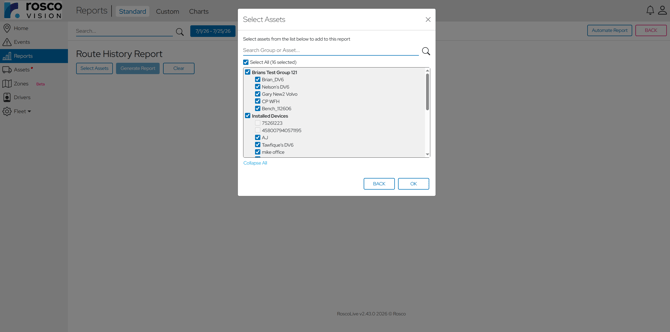
Select one or multiple vehicles and a date range to generate the report.
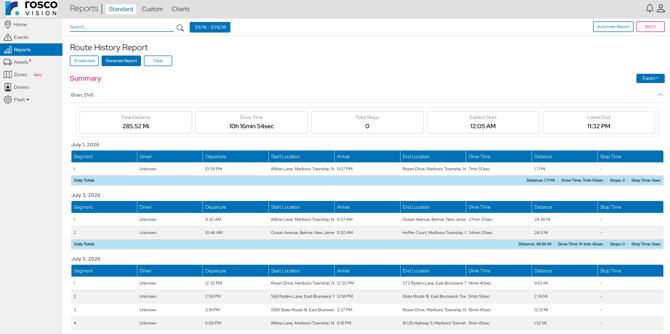
Review route activity summaries and expand each day to view individual trip details.
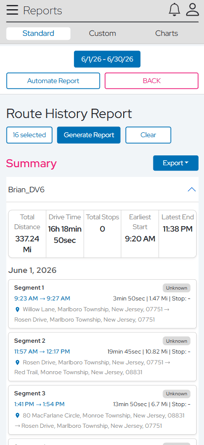 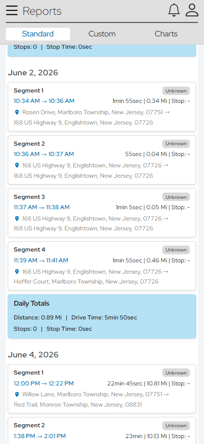
The mobile-friendly card view makes route history easier to review on smaller screens.
#### **Fleet Manager Dashboard**
RoscoLive now introduces a new dashboard experience for **Fleet Manager** users, providing a high-level overview of important fleet information.
The updated flow separates dashboard information from the full map experience, making it easier for Fleet Managers to review key fleet activity on dashboard page and open the Map page when they need more detailed location information.
**What's New**
- A new Homepage dashboard is available for Fleet Manager users.
- The dashboard provides a high-level view of important fleet information.
- The updated Homepage is designed to make important fleet information easier to review at a glance.
**Why It Matters**
Fleet Managers can now start with a clearer summary of their fleet. This makes it easier to identify important information quickly.
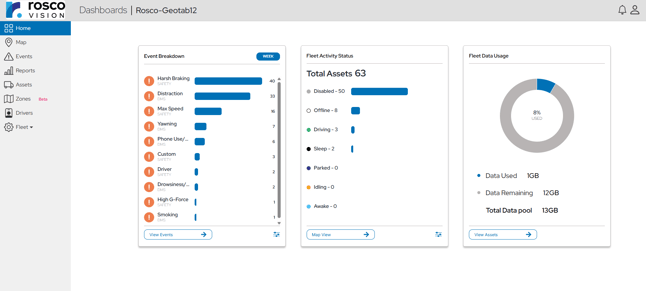
Fleet Managers can review key fleet information from the new RoscoLive dashboard.
#### **Custom Polygon Zones**
RoscoLive now gives users more flexibility when creating zones by supporting custom polygon shapes.
Instead of creating only circular zones, users can draw a customized boundary around a specific location or area. These zones can also be used when reviewing events and filtering report results.
**What's New**
- Users can create zones using a custom polygon shape.
- Multiple points can be added to define a precise zone boundary.
- Polygon zones can be viewed and managed from the Zones page.
- Zone boundaries can be displayed while reviewing applicable events.
- Reports can be filtered using a selected zone.
**Why It Matters**
Custom polygon zones help fleet managers define locations more accurately. This provides better visibility for areas that cannot be represented well by a simple circular boundary.
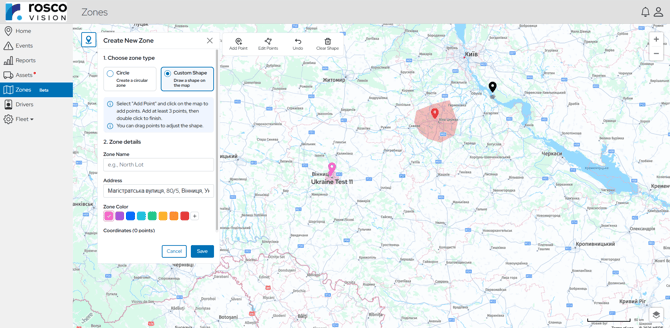
Choose between a circular zone or a custom shape when creating a new zone.
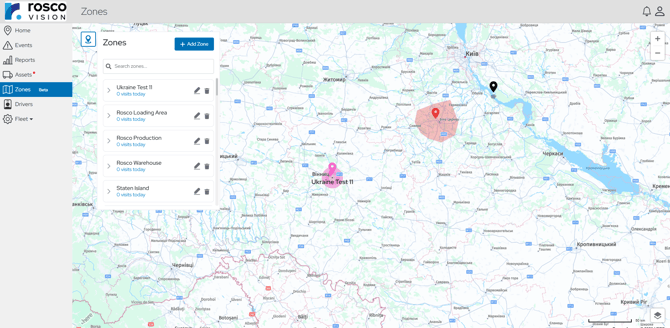
View and manage saved zones from the Zones page.
#### **Feature Request Form**
RoscoLive users can now submit ideas and suggestions directly through the new **Feature Request** form.
The form is available from the user menu, giving customers an easy way to share feedback and suggest features they would like to see in future RoscoLive releases.
**What's New**
- Customers can submit product ideas and enhancement requests directly to the RoscoLive team.
- The form provides a simple way to share feedback without contacting support separately.
**Why It Matters**
Customer feedback helps guide future RoscoLive improvements. The new Feature Request form makes it easier for users to share ideas directly with the product team.

Customers can submit product ideas directly through the new Feature Request form.
### **✨**Improvements
#### **Faster RoscoLive Page Loading**
RoscoLive now uses client-side pre-caching to improve page-loading performance across the platform.
Frequently used page data can be prepared in advance, helping users move between RoscoLive pages with less waiting and a smoother overall experience.
**What's New**
- Improved loading performance across supported RoscoLive pages.
- Frequently used data is pre-cached in the browser.
- Previously visited pages can load more quickly when users return to them.
**Why It Matters**
Faster page loading helps users move through RoscoLive more efficiently, especially when switching between frequently used areas. This reduces waiting time and improves the overall experience without changing existing workflows.
#### **Improved Profile Settings and Device Compatibility**
RoscoLive now provides clearer profile organization and improved device compatibility controls for DV4 andDV6devices.
Profiles are organized by device type, helping users find the correct configuration more easily. When a profile is pushed to assets, RoscoLive displays only assets that are compatible with the selected profile.
**What's New**
- Fleet profiles are organized by device type.
- DV4 and DV6 profiles are displayed in their appropriate groups.
- Each profile is associated with a specific device type.
- The **Push to Assets** window displays only compatible assets.
- DV4 and DV6 profiles cannot be pushed to the wrong device type.
- Profile information and available actions are easier to review from the Profile Settings page.
**Why It Matters**
These improvements reduce the risk of applying an incompatible profile to a device. Users can manage fleet configurations more confidently and find the correct profiles and assets more quickly.
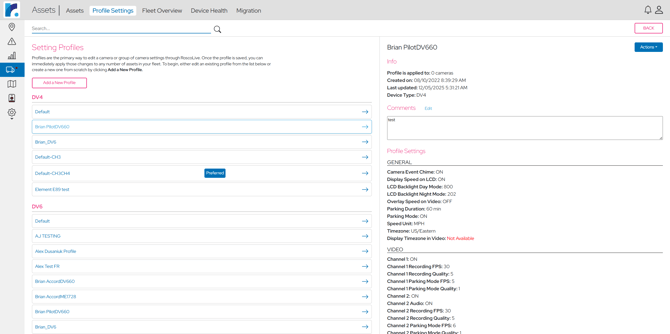
Fleet profiles are organized by device type, making the correct configuration easier to find.
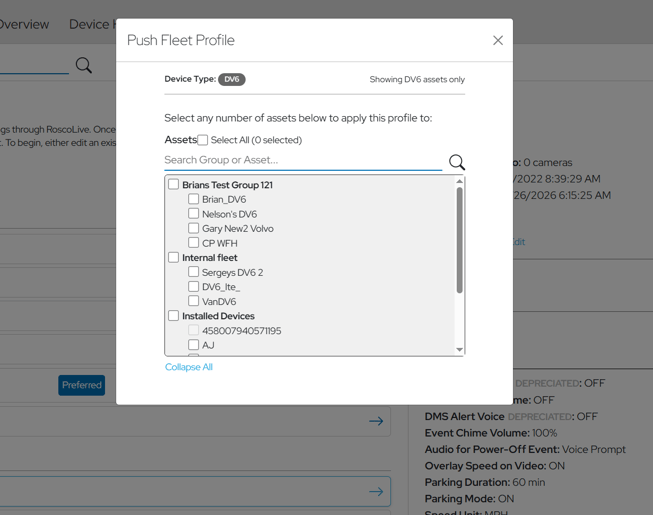
RoscoLive displays only assets that are compatible with the selected fleet profile.
#### **Clearer Device Storage Information**
RoscoLive has updated how **Storage** information is displayed on the Primary Device Information page.
Instead of using graphical storage bars, storage details are now shown as clear text values, making the information easier to read and understand.
**What's New**
- Storage information is now displayed as text values.
- The previous graphical bar indicators have been removed.
- Available storage details are easier to read at a glance.
- The change applies to the **Primary Device Information** page.
- Existing device information and functionality remain unchanged.
**Why It Matters**
The updated design makes storage information easier to interpret and reduces confusion when reviewing device status.
#### **Geotab Timestamp and Time Zone Display**
This feature is specific to customers using the **RoscoLive Geotab Add-In**.
RoscoLive now displays timestamp information using the Geotab user’s local time zone, helping dates and times remain consistent when users access RoscoLive through Geotab.
**What's New**
- Timestamp information in the RoscoLive Geotab Add-In reflects the current Geotab user’s local time zone.
- Event and trip times are displayed more consistently within the Geotab environment.
- Users who work across different time zones can better understand when activity occurred.
- The update applies to supported RoscoLive Add-In pages within Geotab.
**Why It Matters**
Previously, timestamp information could be confusing when the Geotab user’s time zone differed from the time zone used by RoscoLive. This update provides clearer and more consistent date and time information for Geotab users.
#### **Reduced Duplicate Video Uploads for Overlapping Events**
RoscoLive now improves how video is handled when multiple events occur during the same or overlapping time period.
Instead of uploading separate copies of the same video for each overlapping event, RoscoLive can use a single video clip across the related events.
**What's New**
- Overlapping events can share the same video clip.
- RoscoLive avoids uploading duplicate copies of identical event footage.
- Each related event can still access the applicable video.
- Video handling has been updated across event processing, storage, notifications, and related services.
- Existing event review workflows remain available to users.
**Why It Matters**
When several safety or ADAS events happen close together, they can reference the same period of video. Reusing one clip reduces unnecessary duplicate uploads and storage while keeping the footage available for each applicable event.
### **✨**Mobile Experience Improvements
RoscoLive has expanded its mobile web experience across several key areas of the platform, making it easier for fleet managers to review information, navigate pages, and take action from a phone or tablet.
#### **Homepage**
RoscoLive’s Homepage has been updated with a more responsive layout designed for smaller screens.
The new responsive layout makes it easier for users to view fleet status, select assets, review, trip activity and interatc with the map from smaller screen
**What's New**
- The Homepage now adapts more effectively to mobile screen sizes.
- The updated layout improves navigation between fleet information, trip details, and the map.
**Why It Matters**
Fleet managers often need to review vehicle activity while away from a desktop computer. The updated mobile Homepage makes important fleet information easier to access and use from a phone or tablet.
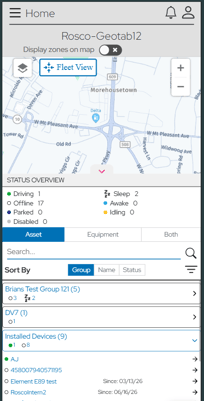
Use the responsive map to review the selected asset’s location and activity.
#### **Assets Page**
RoscoLive’s **Assets page** has been redesigned to provide a cleaner and more usable experience on mobile devices.
Instead of displaying the full desktop table on a small screen, asset information is reorganized into a mobile-friendly layout that is easier to read, navigate, and interact with.
**What's New**
- The Assets page now adapts more effectively to mobile screen sizes.
- Asset information is displayed in a cleaner, mobile-friendly format.
- Important asset details are easier to review without excessive horizontal scrolling.
- Users can search for and select assets more easily from a phone or tablet.
- Asset actions and navigation remain accessible on smaller screens.
- The desktop Assets page continues to work as before.
**Why It Matters**
Fleet managers often need to review asset information while away from a desktop computer. The redesigned mobile Assets page makes important vehicle and device information easier to access and manage from a phone or tablet.
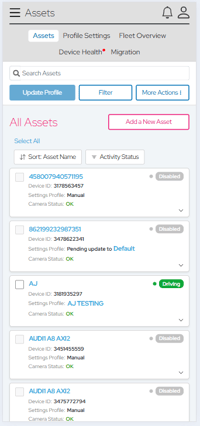 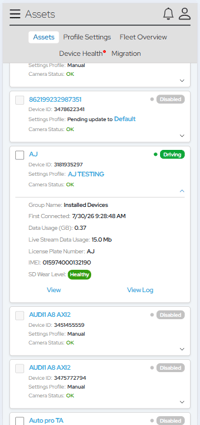
Access important asset information and available actions from a smaller screen.
#### **Events Page**
RoscoLive’s **Events page** has been updated for mobile devices by replacing the desktop-style table with a more readable card layout.
Each event is displayed as its own card, making important information and actions easier to review from a phone or tablet.
**What's New**
- Events are displayed as individual cards on mobile devices.
- Important event information is easier to read without horizontal scrolling.
- Event type, asset information, date/time, and other key details remain visible in the mobile layout.
- Users can access event actions directly from the card.
- The desktop Events table remains unchanged.
**Why It Matters**
The new mobile card layout makes it easier for fleet managers to review events while away from a desktop computer. Users can quickly scan event information and open the event they need without navigating a full desktop table on a smaller screen.
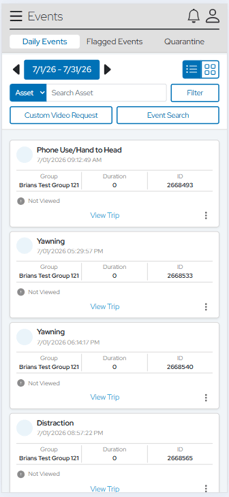 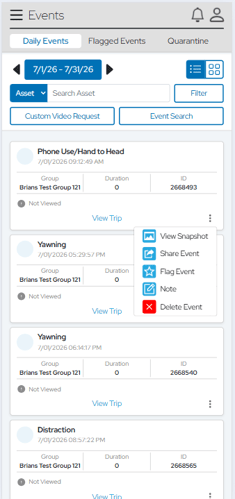
Access event details and actions directly from the mobile event card.
- [RoscoLive](https://support.roscovision.com/knowledge/roscolive?hsLang=en#main-content)
- [Developer Resources](https://support.roscovision.com/knowledge/roscolive?hsLang=en#developer-resources)
- [Guides](https://support.roscovision.com/knowledge/roscolive?hsLang=en#guides)
- [Releases & Announcements](https://support.roscovision.com/knowledge/roscolive?hsLang=en#releases-announcements)
- [RoscoLive-Geotab](https://support.roscovision.com/knowledge/roscolive-geotab?hsLang=en#main-content)
- [Release Notes](https://support.roscovision.com/knowledge/roscolive-geotab?hsLang=en#release-notes)
- [User Guides](https://support.roscovision.com/knowledge/roscolive-geotab?hsLang=en#user-guides)
- [360AHD](https://support.roscovision.com/knowledge/360ahd?hsLang=en#main-content)
- [Quick Start Guide](https://support.roscovision.com/knowledge/360ahd?hsLang=en#quick-start-guide)
- [User Manual](https://support.roscovision.com/knowledge/360ahd?hsLang=en#user-manual)
- [RoscoLive Installer App](https://support.roscovision.com/knowledge/roscolive-installer-app?hsLang=en#main-content)
- [Release Notes](https://support.roscovision.com/knowledge/roscolive-installer-app?hsLang=en#release-notes)
- [User Guide](https://support.roscovision.com/knowledge/roscolive-installer-app?hsLang=en#user-guide)
- [Installer Certification Knowledge Base](https://support.roscovision.com/knowledge/roscolive-installer-app?hsLang=en#installer-certification-knowledge-base)
- [DV6 Dash Cam](https://support.roscovision.com/knowledge/dv6-dash-cam?hsLang=en#main-content)
- [User Manual](https://support.roscovision.com/knowledge/dv6-dash-cam?hsLang=en#user-manual)
- [Specifications](https://support.roscovision.com/knowledge/dv6-dash-cam?hsLang=en#specifications)
- [Brochure](https://support.roscovision.com/knowledge/dv6-dash-cam?hsLang=en#brochure)
- [Install Guide](https://support.roscovision.com/knowledge/dv6-dash-cam?hsLang=en#install-guide)
- [Quick Start Guides](https://support.roscovision.com/knowledge/dv6-dash-cam?hsLang=en#quick-start-guides)
- [DV7 Dash Cam](https://support.roscovision.com/knowledge/dv7-dash-cam?hsLang=en#main-content)
- [Quick Start Guides](https://support.roscovision.com/knowledge/dv7-dash-cam?hsLang=en#quick-start-guides)
- [Driver ID](https://support.roscovision.com/knowledge/driver-id?hsLang=en)
- [Asset Tracker](https://support.roscovision.com/knowledge/asset-tracker?hsLang=en)
- [DV-Pro5 Player](https://support.roscovision.com/knowledge/dv-pro5-player?hsLang=en)
- [DVXC4 Dash Cam](https://support.roscovision.com/knowledge/dvxc4-dash-cam?hsLang=en#main-content)
- [Brochure](https://support.roscovision.com/knowledge/dvxc4-dash-cam?hsLang=en#brochure)
- [Quick Start Guide](https://support.roscovision.com/knowledge/dvxc4-dash-cam?hsLang=en#quick-start-guide)
- [Specifications](https://support.roscovision.com/knowledge/dvxc4-dash-cam?hsLang=en#specifications)
- [Installation](https://support.roscovision.com/knowledge/dvxc4-dash-cam?hsLang=en#installation)
- [Firmware Upgrade](https://support.roscovision.com/knowledge/dvxc4-dash-cam?hsLang=en#firmware-upgrade)
- [Troubleshooting](https://support.roscovision.com/knowledge/dvxc4-dash-cam?hsLang=en#troubleshooting)
- [User Manuals](https://support.roscovision.com/knowledge/dvxc4-dash-cam?hsLang=en#user-manuals)
- [Contact Us](https://support.roscovision.com/knowledge/contact-us?hsLang=en)
- [Troubleshooting Guides](https://support.roscovision.com/knowledge/troubleshooting-guides?hsLang=en)
- [DV6](https://roscolive.com/#dv6)
- [RoscoLive](https://roscolive.com/#rosco-live)
- [Integration Partners](https://roscolive.com/#integration-partners)
- [Why Rosco](https://roscolive.com/#why-rosco)
[](https://www.roscovision.com)
[mailto:email@email.com](mailto:email@email.com)
Copyright © 2025, Rosco Vision