
✨ New Features
Enhanced Fleet Dashboard
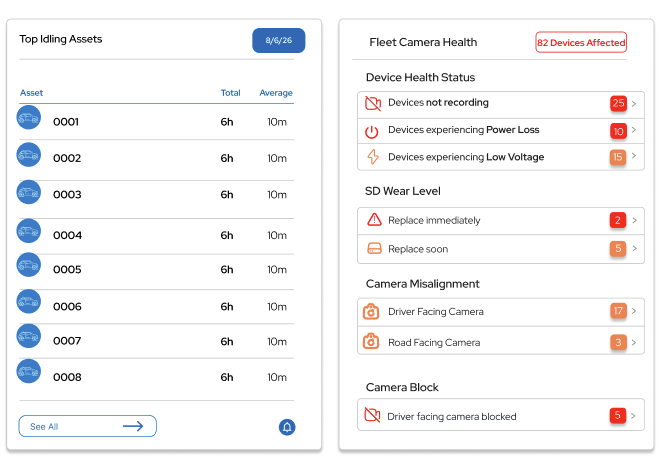
What’s New: The Fleet Dashboard introduces a new Top Idling Assets tile, highlighting vehicles with the highest total and average idling time. Users can select an asset to view its detailed idling breakdown. A new Fleet Camera Health tile provides a centralized overview of device and camera issues across the fleet, including device status alerts, SD card wear, camera misalignment, and blocked driver-facing cameras.
The dashboard also introduces greater customization, allowing users to add, remove, and rearrange tiles.
AI Assistant Beta – Fleet Insights at a Glance
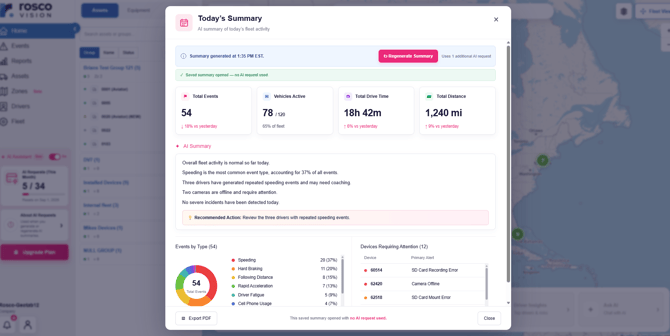
What’s New: Introducing AI Assistant Beta, a new feature on the RoscoLive Home page that generates AI-powered fleet insights through Today’s Summary and Weekly Summary. Summaries highlight key fleet metrics, including events, active vehicles, driving time, distance, event breakdowns, and devices requiring attention. Users can generate summaries on demand, and revisit previously saved summaries.
Redesigned RoscoLive Home Page
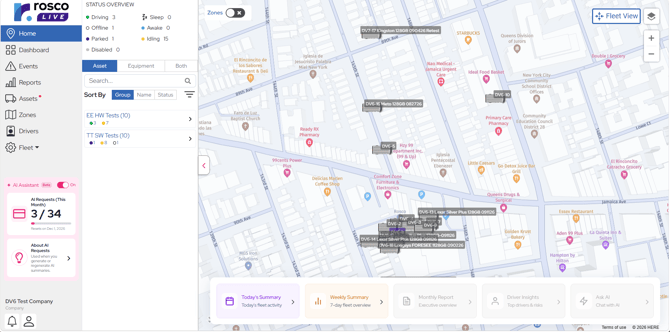
What’s New: The RoscoLive Home page features an updated layout designed to make better use of screen space and simplify navigation. Existing map, fleet view, asset search, zone controls, and trip information remain accessible within the updated layout.
Enhanced Channel Access Controls
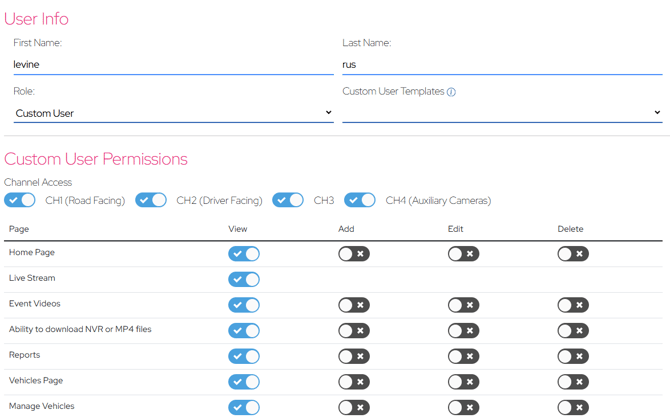
What’s New: A new channel selection setting in Custom User Settings allows administrators to control which camera channels custom users can access. Channel permissions apply across supported features, including livestreams, event snapshots, video clips, reports, and more.
WEX Fuel Integration & IFTA Reporting
What’s New: Integrated WEX fuel cards to automatically import daily transactions and match fuel purchases to fleet vehicles. Enhanced IFTA reporting combines fuel and mileage data, providing jurisdiction- and asset-level breakdowns of miles driven, gallons purchased, and fuel costs to simplify fuel tracking and IFTA preparation.
For more information on purchasing fuel cards, please contact videomatics@roscovision.com.
Improved Speed Limit Detection and Alerts
What’s New: RoscoLive is introducing an enhanced speed limit data service to improve speed limit detection and support more timely speeding alerts across DV6 and DV7 devices. The enhancement combines road speed limit information with speed sign data collected by devices, building a more comprehensive speed limit database. It also lays the groundwork for generating speed limit events and video clips while a trip is in progress rather than waiting until the trip ends.
BeWhere Geofence Support
What’s New: Existing RoscoLive geofencing functionality is extended to support PulseCore and PulseSol asset trackers. Users can manage geofences on asset trackers using the same interface and configuration options available for DV devices. Entry and exit events are generated when new location updates confirm that an asset has crossed a geofence boundary.
Installer Certification Program
What's New: Introduced mandatory installer certification to ensure installers understand proper camera mounting, ADAS/DMS alignment, and DV wiring and power requirements. Certification status is verified through the Installer App, with automated test results, reminders, and access restrictions for installers who do not pass within the required timeframe.