
Maintenance Recommendation
-
Format the microSD card every six months using the RoscoLive remote Format SD function or the DV-Pro5 formatter. Do not use the default PC formatter or any unapproved third-party formatting tools. On DV6 devices running firmware version 2.9.0 or later, and on all DV7 firmware versions, a brand-new card inserted for the first time will be formatted automatically.
Notes:
1. In RoscoLive, the Format SD option is available on the Assets page. Refer to the screenshot below for navigation guidance.
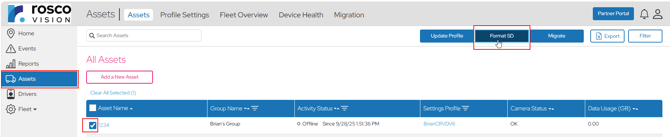
2. Please click here to understand the process of formatting SD cards through DV-Pro5 player.
-
Replace removable microSD cards after 24-30 months of normal fleet use, or sooner if file corruption, recording errors, or card detection issues are observed.
-
Treat microSD cards as consumable recording media. Endurance depends on recording workload, environment, temperature exposure, power events, and the specific card model used.
Requirements
|
Topic |
Recommended Guidance |
Technical Rationale |
|
Formatting interval |
Every 6 months, or immediately after file corruption, recording errors, abnormal SD status codes, or support-directed troubleshooting. |
Formatting refreshes the file system and can resolve file-system corruption or device-specific formatting mismatches. It does not reset NAND wear or restore programmed flash blocks. |
|
Approved formatting methods |
Use RoscoLive remote Format SD or the DV-Pro5 formatter whenever available. |
These methods prepare the card in the file-system format expected by the DV recorder and reduce support risk. |
|
PC formatting |
Avoid Windows Quick Format, Windows Full Format, and unapproved third-party tools for customer support instructions. |
Large SDXC cards commonly ship as exFAT, while DV6 uses FAT32. PC formatting workflows can create incompatible card layouts. |
|
Replacement interval |
Use a conservative service interval of 24-30 months for typical fleet use; replace sooner if errors occur. |
Cards are consumable storage media. Field reliability is affected by workload, write cycles, temperature, vehicle power conditions, and card firmware behavior. |
|
Removal handling |
Power down the recorder before removing the card. |
Removing media during active recording or power instability can corrupt data or damage the file system. |
Formatting Guidance
Recommended Method
- If the vehicle is online and accessible in RoscoLive, use the RoscoLive remote Format SD function from the vehicle/device menu.
- If the card must be serviced locally, use the DV-Pro5 formatter supplied by Rosco.
- After formatting, reinstall the card, allow the recorder to boot fully, and confirm that recording resumes and no SD card status errors remain active.
Important Notice
• Formatting erases stored video and event files. Preserve required evidence before formatting or replacing the card.
• Formatting can resolve file-system problems, but it does not reverse NAND wear or guarantee recovery from a card firmware in hard-lock condition.
Why PC Formatting Is Not Recommended
DV6/DV7 uses FAT32 for removable microSD operation. Many SDXC cards are supplied as exFAT, and standard Windows formatting options may not offer a supported FAT32 workflow for large-capacity cards. To ensure the microSD card is formatted correctly for the DV recorder, use the RoscoLive remote Format SD function or the Rosco DV-Pro5 formatter.
Replacement and Endurance Guidance
Endurance is workload dependent. A card with a TBW rating of 175TB can support approximately 58,333 recording hours at a workload of 50MB per minute, based on 3GB written per recording hour. This theoretical TBW calculation is not the recommended customer replacement interval; the service interval remains conservative because field life is also affected by temperature, vibration, vehicle power cycling, firmware behavior, and file-system integrity.
|
Assumption / Calculation |
Value |
|
Card endurance example |
175 TB TBW |
|
Video storage workload |
50 MB per minute |
|
Data written per hour |
50 MB x 60 = 3,000 MB = 3 GB/hour |
|
24-hour recording workload |
3 GB/hour x 24 = 72 GB/day |
|
Theoretical TBW life at 24 hours/day |
175 TB / 26.28 TB/year = approximately 6.66 years |
|
Theoretical total recording hours |
175 TB / 3 GB/hour = approximately 58,333 recording hours |
|
Recommended fleet service interval |
Replace at 24-30 months of normal use or sooner if symptoms occur |
Technical Clarification
-
DV6 and DV7 use SDXC microSD cards, with supported storage capacities ranging from 128 GB to 1 TB.
-
A larger-capacity card does not automatically last longer if the TBW rating and workload are the same. TBW, workload, write amplification, and controller behavior are the primary endurance drivers.
-
Capacity may influence wear distribution, but support guidance should not promise a fixed life based on capacity alone.
Event Video Storage Behavior
Event reserved space:
DV6: DV6 recorders reserve 10% of the card capacity as buffer space for performance and 25% of the total recordable storage space for event recordings. When the event partition reaches capacity, the oldest event files are overwritten by newer event files using a FIFO (First In, First Out) method.
128 GB example: If 10% of the card is reserved as free space for performance, approximately 115.2 GB remains available for video storage. Approximately 25% of that recordable storage is reserved for event recordings, with the remainder allocated to normal recordings. Actual allocated values may vary based on firmware, formatting, and the exact card capacity reported by the device.
DV7: DV7 recorders include up to 128 GB of onboard storage by default, and an SD card can be added for additional storage of up to 1 TB, depending on customer preference. DV7 recorders may therefore operate using onboard storage only or with both onboard and SD card storage. Both onboard storage and additional SD card storage reserve 10% of total capacity as buffer space for performance. Unlike DV6 recorders, DV7 recorders do not reserve 25% of total recordable storage specifically for event recordings. Instead, the remaining 90% of storage is used for all recordings, including both event and normal recordings.
When available storage reaches capacity, the oldest files from onboard storage are cascaded to the SD card. Once the SD card reaches capacity, the oldest files are overwritten by newer files using a FIFO (First In, First Out) method. This storage design generally provides longer recording retention than DV6 especially when SD card is included as an additional storage on the recorder, while the most recent files remain stored on the onboard memory. For additional information on the DV7 cascading recording architecture, please click here.
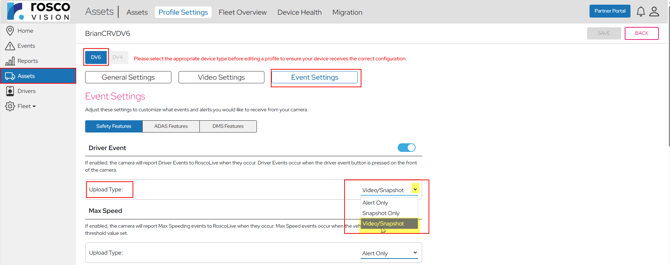
To retain any event videos for a longer period, enable the required event types in the device profile within RoscoLive and change the upload type for any particular events on the Profiles page from the default Snapshot/Alert setting to Video/Snapshot, as shown in the screenshot below:
Handling and Preventive Care
|
Preventive Measure |
Guidance |
|
Power down before removal |
Avoid removing the card while the recorder is powered or actively writing. |
|
Handle by the edges |
Avoid touching metal contacts. |
|
Avoid bending/twisting |
microSD cards are small and can be physically damaged by force. |
|
Use clean, static-safe handling |
Reduce the risk of electrostatic discharge and contamination. |
|
Store in a protective case |
Protect against dust, fluids, and physical stress when not installed. |
|
Avoid liquid exposure |
Moisture can cause corrosion or short circuits. |
|
Avoid extreme heat/cold when stored outside the device |
Storage outside the vehicle should be in a controlled environment. |
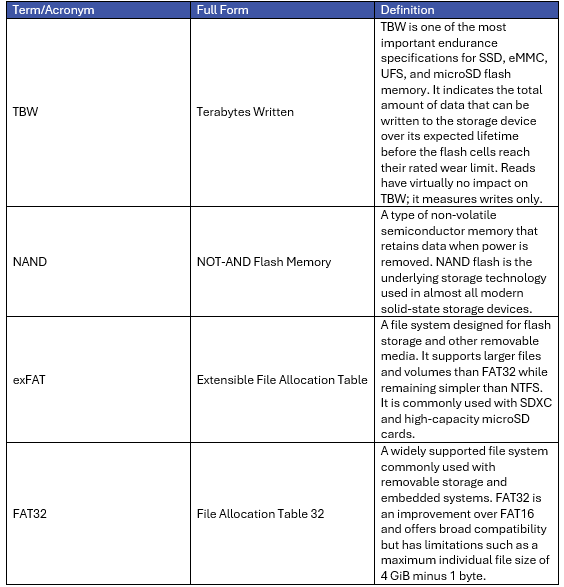
Technical Terms and Definitions
Disclaimer
This bulletin is intended to provide general service guidance for supported DV recorder configurations. Actual device behavior can vary by product model, firmware version, vehicle power conditions, installation quality, microSD card model, and customer operating environment. RoscoLive / Rosco is not responsible for card damage, data loss, or device issues caused by customer mishandling, unsupported tools, improper removal, or use of unapproved media. Always preserve required video evidence before formatting or replacement.